alirahimi-website

Portfolio Showcase Project With NextJS + Cursor AI
SSG rendering for GitHub pages. A modern, responsive portfolio website built with Next.js 14, TypeScript, and Tailwind CSS.
Project Description
This project was developed by Cursor AI with hundreds of prompts as an exercise to understand the abilities and weaknesses of AI editors. Through this experience, I discovered effective practices for using AI-powered development tools in real-world projects.
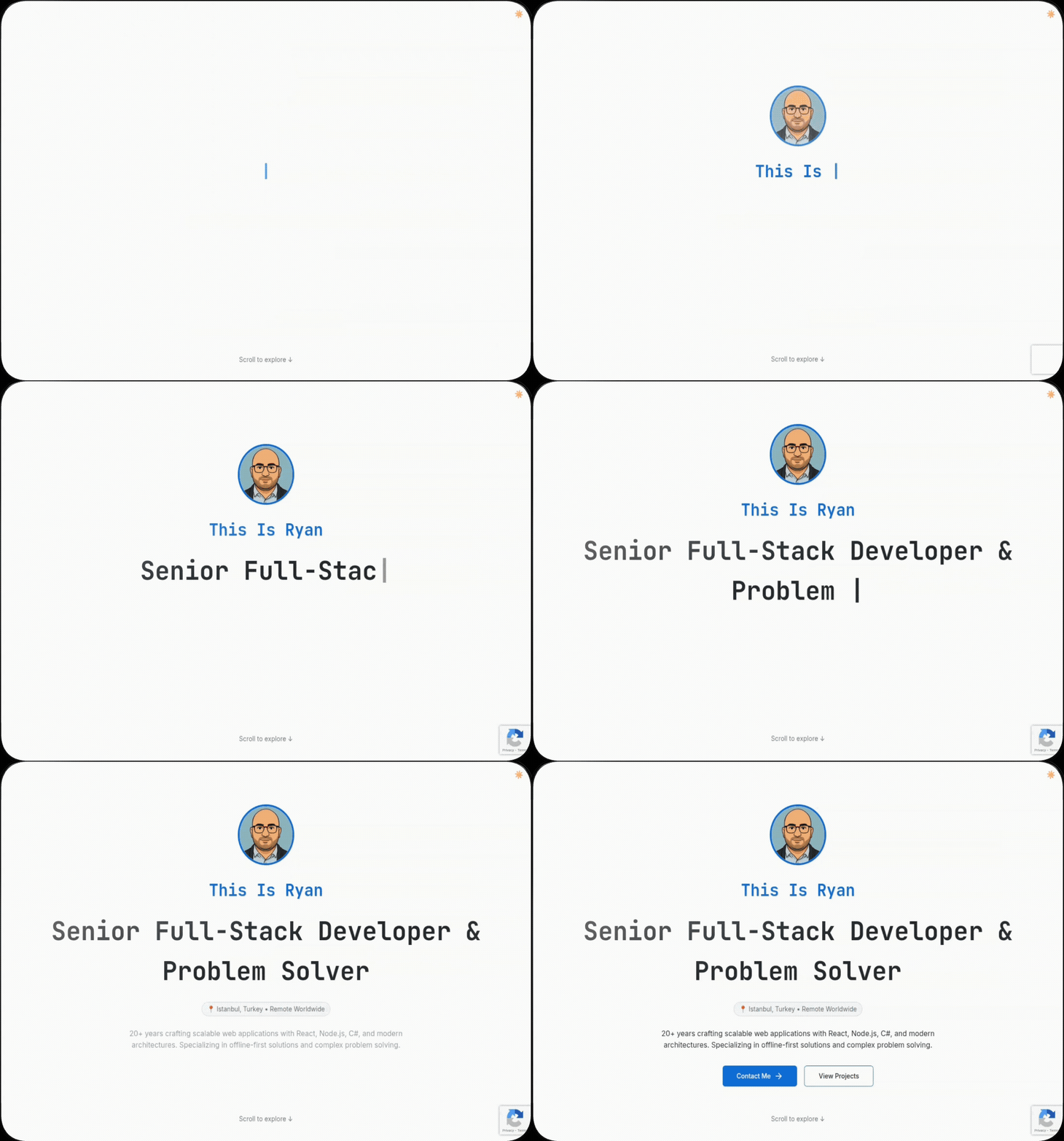
The portfolio features a GitHub-style aesthetic with interactive scroll animations, built using modern web technologies and optimized for static deployment. It showcases advanced React patterns, performance optimization techniques, and demonstrates how to leverage AI tools for professional development workflows.
Key Features:
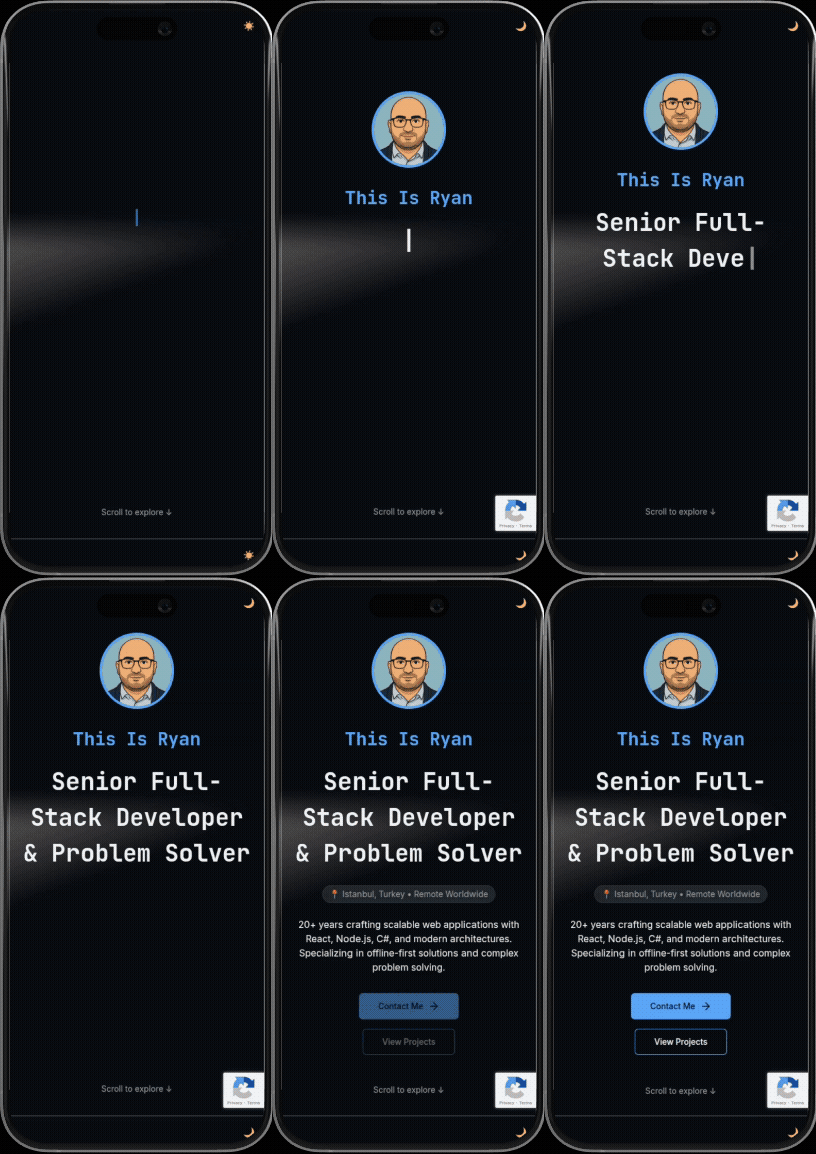
- 🎨 GitHub-inspired design system with dark/light theme support
- 🚀 Interactive scroll animations using Framer Motion
- 📱 Fully responsive design for all devices
- 📝 Built-in blog system with Markdown support
- ⚡ Performance optimized with Next.js 14 App Router
- 🔄 Automated deployment to GitHub Pages
- 🎯 SEO optimized with structured data
- ♿ Accessibility compliant with ARIA support
- 🧪 Comprehensive test suite with Jest and Testing Library
All development experiences and AI collaboration insights are documented in the published blog at https://attarchi.github.io
Screenshots
Technology Stack
| Technology | Version | Purpose |
|---|---|---|
| Next.js | 14.1.0 | Static site generation with App Router |
| React | ^18 | Component-based UI development |
| TypeScript | ^5 | Type safety and developer experience |
| Tailwind CSS | ^3.3.0 | Utility-first styling system |
| Framer Motion | ^7.10.3 | Advanced animations and interactions |
| Lucide React | ^0.511.0 | Beautiful icon system |
| Marked | ^9.0.0 | Markdown parsing for blog posts |
| Jest | ^29.7.0 | Testing framework |
| Testing Library | ^16.3.0 | Component testing utilities |
Quick Start
Prerequisites
- Node.js 18+
- Yarn package manager
- Git
Installation
- Fork this repository to your GitHub account
- Clone your fork locally:
git clone https://github.com/YOUR-USERNAME/YOUR-USERNAME.github.io.git cd YOUR-USERNAME.github.io - Install dependencies:
yarn install - Start development server:
yarn dev - Open http://localhost:3000 to view the portfolio
How to Use It
1. Fork and Customize
- Fork this repository under your GitHub profile name
- The repository name should be
YOUR-USERNAME.github.iofor automatic GitHub Pages deployment
2. Edit Content
- Navigate to the
src/contentfolder - Edit portfolio information, projects, and blog posts
- Pro tip: Use GitHub’s online editor by changing
.comto.devin the URL
3. Content Structure
src/content/
├── hero.ts                    # Main headline, description
├── projects.ts                # Featured projects with tech stacks
├── contact.ts                 # Contact information
├── footer.ts                  # Footer content
├── professional-journey.ts    # Professional timeline
├── technical-expertise.ts     # Technical expertise
├── blog-page.ts               # Blog page configuration
├── blog-filters.ts            # Blog filtering options
├── theme.ts                   # Theme configuration
├── icon.ts                    # Icon definitions
├── icon-manifest.json         # Icon manifest for tech stack
└── posts/                     # Blog posts in Markdown format
4. Automatic Deployment
- Commit your changes to the
mainbranch - GitHub Actions will automatically build and deploy to GitHub Pages
- Your portfolio will be live at
https://YOUR-USERNAME.github.io
5. Custom Domain (Optional)
- Add a
CNAMEfile to thepublicfolder with your custom domain - Configure DNS settings with your domain provider
- Update GitHub repository settings to use custom domain
Development Commands
# Development server
yarn dev

# Production build
yarn build

# Start production server
yarn start

# Run tests
yarn test

# Run tests in watch mode
yarn test:watch

# Generate test coverage
yarn test:coverage

# Lint code
yarn lint

# Deploy to GitHub Pages
yarn deploy
Project Structure
attarchi.github.io/
├── .github/workflows/        # GitHub Actions deployment
│   ├── deploy.yml            # Automated deployment
│   └── test.yml              # CI/CD testing
├── public/                   # Static assets
│   ├── icons/                # Technology icons
│   └── avatar.png            # Profile image
├── src/
│   ├── app/                  # Next.js App Router pages
│   │   ├── blog/             # Blog pages
│   │   ├── thank-you/        # Contact form success page
│   │   └── globals.css       # Global styles
│   ├── components/           # Reusable UI components
│   │   ├── micro/            # Atomic components
│   │   ├── sections/         # Page sections
│   │   └── blog/             # Blog-specific components
│   ├── content/              # Portfolio and blog content
│   ├── lib/                  # Utility functions and hooks
│   └── utils/                # Testing utilities
├── __tests__/                # Test files
├── docs/                     # Project documentation
│   ├── design-outline-proposal.md
│   ├── technical-proposal.md
│   ├── portfolio-content-specification.md
│   └── Phase*.md             # Development phase documentation
└── jest.config.ts            # Jest configuration
Customization Guide
Design System
The project uses a GitHub-inspired color palette with full dark/light mode support:
// Customize colors in tailwind.config.js
colors: {
  background: 'hsl(var(--background))',
  foreground: 'hsl(var(--foreground))',
  primary: 'hsl(var(--primary))',
  // ... more theme colors
}
Typography
- Primary Font: JetBrains Mono (headings, code)
- Secondary Font: Inter (body text)
- Customizable through CSS variables
Animations
All animations are built with Framer Motion and respect prefers-reduced-motion:
// Example animation variant
const fadeInUp = {
  hidden: { opacity: 0, y: 20 },
  visible: { opacity: 1, y: 0, transition: { duration: 0.6 } }
}
Blog System
Creating Blog Posts
- Add new
.mdfiles tosrc/content/posts/ - Include frontmatter with metadata:
--- title: "Your Blog Post Title" date: "2025-01-15" excerpt: "Brief description of the post" tags: ["react", "nextjs", "tutorial"] --- Your content here... - Posts automatically appear on the blog page with SEO optimization
Current Blog Posts
- Building Offline-First Apps: Guide to creating resilient web applications
Supported Features
- ✅ Syntax highlighting for code blocks
- ✅ Auto-generated table of contents
- ✅ Tag-based filtering
- ✅ Reading time estimation
- ✅ Social sharing buttons
Testing Strategy
The project follows Test-Driven Development (TDD) principles:
Testing Guidelines
- TDD Workflow: Write test first, then implementation
- Component Testing: Test functionality, not appearance
- Coverage: Aim for comprehensive test coverage
- Mocking: Use dedicated mock files for isolated testing
Running Tests
# Run all tests
yarn test

# Run tests in watch mode
yarn test:watch

# Generate coverage report
yarn test:coverage
Contributing
Feel free to open issues or submit pull requests for any improvements. This is a showcase project, but contributions are welcome! Please follow these guidelines:
Development Guidelines
-
Tests: Remove extra tests; focus on component-specific functionality. Remove CSS-based tests and duplicated logic.
- Imports: Use folder-based imports with index files. All folders should export public components only:
// ✅ Good import { Button } from '@/components/ui' // ❌ Avoid import { Button } from '@/components/ui/button/Button' - Path Management: Use
@/*aliases instead of relative paths beyond one level:// ✅ Good import { utils } from '@/lib/utils' // ❌ Avoid import { utils } from '../../../lib/utils' -
Content Management: All content belongs in
src/content/with proper TypeScript interfaces. Remove hardcoded data from components. -
Type Definitions: Keep types close to their usage. Only use
src/types/for shared interfaces to avoid circular dependencies. -
Component Mocking: Each component should have a mock version in
__mocks__/for isolated testing. -
Code Cleanup: Remove unused exports, files, and components. Eliminate unnecessary comments in favor of descriptive naming.
-
Quality Assurance: Run
yarn testandyarn buildafter each change. Fix any breaking changes immediately. -
Focused Changes: Apply improvements only to the specific component/file and its direct dependencies.
- Confirmation: Ensure all changes pass tests and build successfully before submitting.
Contribution Process
- Fork the repository
- Create a feature branch:
git checkout -b feature/your-feature-name - Make your changes following the guidelines above
- Run tests:
yarn test && yarn build - Commit your changes:
git commit -m 'feat: add your feature' - Push to your branch:
git push origin feature/your-feature-name - Submit a Pull Request
Priority Areas for Contribution
- 🧪 Test suite improvements and cleanup
- 📁 Import structure optimization
- 🎨 Additional animation variants
- 🔧 Build process optimizations
- 📖 Documentation enhancements
- 🌍 Internationalization support
Performance
The project is optimized for excellent performance scores:
- ⚡ Lighthouse Score: 90+ across all metrics
- 🖼️ Image Optimization: Automatic WebP conversion and lazy loading
- 📦 Bundle Optimization: Tree shaking and code splitting
- 🎭 Animation Performance: 60fps animations with hardware acceleration
- 📱 Mobile Optimization: Responsive design with touch interactions
SEO Features
- 📊 Structured Data: Rich snippets for better search visibility
- 🏷️ Meta Tags: Comprehensive OpenGraph and Twitter Card support
- 🗺️ Sitemap: Automatically generated for all pages
- 🤖 Robots.txt: Proper search engine crawling instructions
- 🔗 Canonical URLs: Prevents duplicate content issues
Browser Support
- ✅ Chrome 90+
- ✅ Firefox 88+
- ✅ Safari 14+
- ✅ Edge 90+
- ✅ Mobile browsers (iOS Safari, Chrome Mobile)
Documentation & AI Development Insights
Comprehensive documentation is available in the /docs folder - all generated by Claude.ai! These documents demonstrate how I broke down this complex project into simple, single-task prompts that any developer can follow.
What’s in the docs:
- 📋 Project Breakdown: Step-by-step phases with specific AI prompts
- 🎨 Design System Guide: GitHub-inspired aesthetics and implementation
- 📝 Content Strategy: Portfolio structure and blog post templates
- 🛠️ Technical Decisions: Architecture choices and implementation details
- 🤖 AI Collaboration: Effective prompting strategies and workflows
Key Learning: Complex projects become manageable when you break them into focused, single-responsibility prompts. Each document shows exactly how to communicate with AI tools for maximum productivity.
License
MIT License - Feel free to use this code for your own portfolio! (Free to use for educational and commercial purposes)
Copyright (c) 2025 Portfolio Showcase Project

Permission is hereby granted, free of charge, to any person obtaining a copy
of this software and associated documentation files (the "Software"), to deal
in the Software without restriction, including without limitation the rights
to use, copy, modify, merge, publish, distribute, sublicense, and/or sell
copies of the Software, and to permit persons to whom the Software is
furnished to do so, subject to the following conditions:

The above copyright notice and this permission notice shall be included in all
copies or substantial portions of the Software.

THE SOFTWARE IS PROVIDED "AS IS", WITHOUT WARRANTY OF ANY KIND, EXPRESS OR
IMPLIED, INCLUDING BUT NOT LIMITED TO THE WARRANTIES OF MERCHANTABILITY,
FITNESS FOR A PARTICULAR PURPOSE AND NONINFRINGEMENT. IN NO EVENT SHALL THE
AUTHORS OR COPYRIGHT HOLDERS BE LIABLE FOR ANY CLAIM, DAMAGES OR OTHER
LIABILITY, WHETHER IN AN ACTION OF CONTRACT, TORT OR OTHERWISE, ARISING FROM,
OUT OF OR IN CONNECTION WITH THE SOFTWARE OR THE USE OR OTHER DEALINGS IN THE
SOFTWARE.
Support
- 📚 Documentation: Check the
/docsfolder for detailed guides - 🐛 Bug Reports: Open an issue on GitHub
- 💬 Discussions: Use GitHub Discussions for questions
- 📧 Contact: Reach out through the portfolio contact form
Acknowledgments
- Cursor AI: For enabling rapid development through AI assistance
- Vercel Team: For Next.js framework and deployment platform
- Framer: For the powerful animation library
- GitHub: For free hosting and CI/CD through GitHub Pages
Star this repository ⭐ if it helped you create an amazing portfolio!